How to Fix Your Car's USB Port and AUX Interface: A Complete Guide
If you own a Chevy, Buick, Cadillac, or GMC vehicle, you may have encountered issues with your USB port and AUX interface. These components are crucial for connecting your devices and enjoying features like Android Auto and music playback in your car. However, over time, these ports can become faulty, causing frustration for drivers.
One common problem is the USB port and AUX interface failing to charge devices or connect properly. This issue can disrupt your driving experience, especially if you rely on features like Android Auto for navigation and entertainment. Fortunately, there's a solution to this problem: replacing the faulty USB port and AUX interface.
Identifying the Issue:
Before proceeding with the replacement, it's essential to confirm that the USB port and AUX interface are indeed the source of the problem. Here are some signs that indicate these components may be faulty:
- Intermittent Charging: Your devices may not charge consistently when connected to the USB port.
- Connection Errors: Devices may fail to connect or disconnect frequently when plugged into the USB port.
- Malfunctioning Audio: If you experience issues with sound quality or connectivity when using the AUX interface, it could indicate a problem.
If you notice any of these issues, it's likely time to replace the USB port and AUX interface in your vehicle.
Replacing the USB Port and AUX Interface:
Here's a step-by-step guide to replacing the faulty USB port and AUX interface in your vehicle:
- Gather the Necessary Tools: You'll need a set of automotive trim removal tools, a screwdriver set, and the replacement USB port and AUX interface.
- Disconnect the Battery: To prevent any electrical issues, disconnect the vehicle's battery before starting the replacement process.
- Remove the Trim Panel (Optional): Use the trim removal tools to carefully pry off the trim panel surrounding the USB port and AUX interface.
- Disconnect the Wiring Harness: Carefully disconnect the wiring harness connected to the USB port and AUX interface.
- Install the Replacement: Connect the wiring harness to the new USB port and AUX interface, then secure it in place using the mounting screws.
- Reassemble the Trim Panel: Once the replacement is installed, reattach the trim panel by pressing it firmly into place.
- Reconnect the Battery: Finally, reconnect the vehicle's battery to restore power.
Conclusion:
By following these steps, you can successfully replace the faulty USB port and AUX interface in your Chevy, Buick, Cadillac, or GMC vehicle. With the [13519224 USB Port and AUX Interface Jack](insert Amazon link), you can enjoy seamless connectivity and functionality once again, ensuring a hassle-free driving experience.
Disclaimer: Always exercise caution when working on your vehicle's electrical components. If you're unsure about any aspect of the replacement process, consult a professional mechanic.
Parts and Tools

13519224 USB Port, AUX Interface Jack Compatible with Chevy Buick Cadillac GMC New Cruze Equinox Camaro New Lacrosse Verano Envision GL8S Velite5 Enclave
Features
| Part Number | 13519224 |
| Model | 13519224 |
| Color | black |
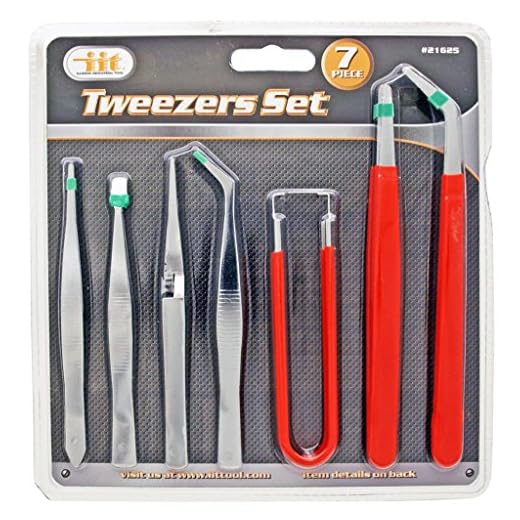
IIT 21625 Industrail Tweezers Set, 7Piece,
Features
| Part Number | 21625 |
| Model | 21625 |

Our E-E-A-T Commitment:
Expertise • Experience • Authoritativeness • Trustworthiness
At TheBest.Onl, we are committed to delivering recommendations you can rely on — grounded in the highest standards of E-E-A-T.
🧠 Expertise (E):Every review is built on solid knowledge and cross-industry research. Our selections are made with deep understanding and ongoing updates to ensure relevance and accuracy.
🔧 Experience (E):We believe in real-world testing. Products and services featured on this platform have been used, examined, and evaluated through firsthand experience — adding practical value to every recommendation.
📣 Authoritativeness (A):Years of hands-on research and consistent quality standards give TheBest.Onl authority in the world of curated product guidance. We don’t follow trends — we set benchmarks.
🔒 Trustworthiness (T):Trust is earned. That’s why we never promote anything we wouldn’t recommend ourselves. Every listing reflects a commitment to honesty, transparency, and genuine quality.